
Seen something you would love to own? Potteries Live lets you browse our auction catalogues and bid online from your computer, tablet or phone. This guide explains how to take part in our live auctions online.
You can explore the catalogue without an account. When you are ready to bid, sign in or create your account, register for the auction and choose how you would like to take part.
There is no additional online bidding surcharge when you bid through Potteries Live. Buyer’s premium, applicable taxes and any other relevant charges still apply.
1) Find something you would like to bid on
Open our upcoming auctions, choose a sale and browse the catalogue. Each numbered entry is called a lot. A lot can be a single item or a group of items sold together.
Select a photograph, lot title or View & Bid to open the full listing. Read the description, look through the photographs and check the estimate, auction date and saleroom location.
The estimate is a guide to the possible hammer price. It is not a fixed selling price and does not include buyer’s premium or other charges.
These screenshots show the Cobridge auction on 30 October 2026 and Lot 1, a Lorna Bailey Art Deco Lady wall plaque. They were captured from Potteries Live on 21 October 2026. Bid amounts and lot availability may change.
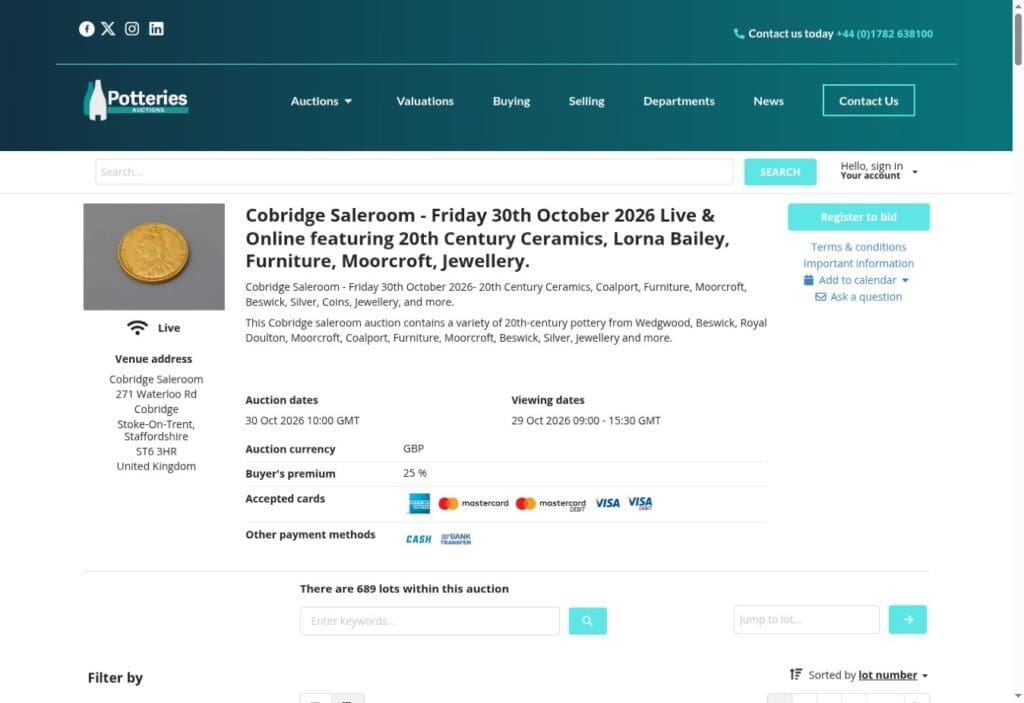
Choose your auction and check its date, viewing details and location. Register to bid appears at the top right of this desktop view.
2) Create your account or sign in
Open Hello, sign in / Your account near the top of Potteries Live. If you are new, choose Sign up here. If you already have an account, choose Sign in.
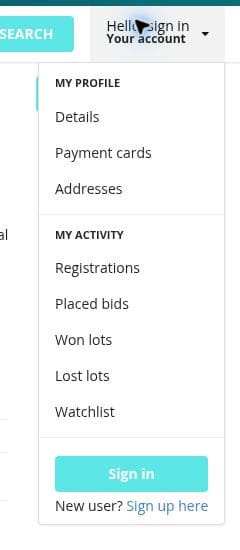
Open Your account, then select Sign up here for a new account or Sign in for an existing account.
Creating a new account
Enter your email address, choose a password and enter it again in Confirm password. Follow the password requirements shown on the form.
The Potteries Auctions marketing checkbox is optional. Read the linked privacy policy and terms before selecting Sign up, then follow any further instructions shown.
Why does the form mention the-saleroom.com? Potteries Live uses the-saleroom.com account system. The sign-up page explains that you are creating a the-saleroom.com account, and the sign-in page accepts those login details. Continue to access our auctions through Potteries Live when you want to bid through our website.
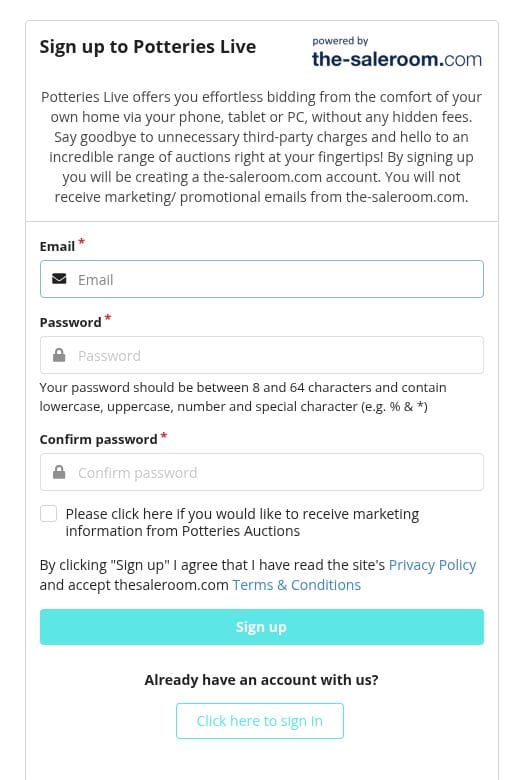
The sign-up form asks for an email address, a password and password confirmation. Marketing consent is optional.
Using an existing account
Already use the-saleroom.com? The Potteries Live sign-in screen tells you to use your the-saleroom.com email address and password. You do not need to create a second account just to sign in here.
If you cannot remember your password, select Forgot password on the sign-in screen.
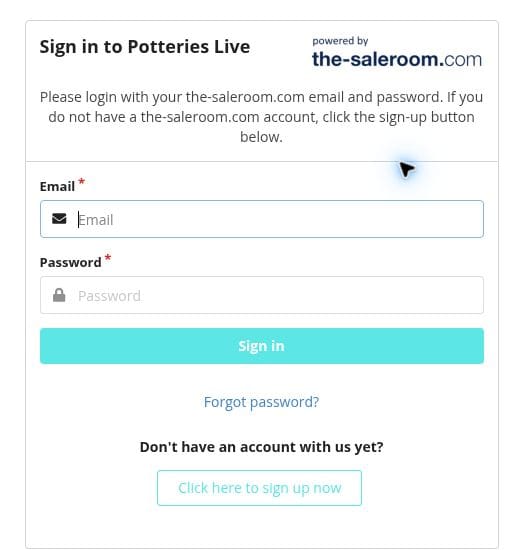
Existing users can sign in with their the-saleroom.com email address and password.
3) Register for the auction
Return to the auction or the lot you are interested in and select Register to bid. If you are not signed in, you will be taken to the sign-in screen first.
Complete the registration instructions shown and read the auction’s terms. Follow any requests to confirm your email address or provide further details.
Your account gives you access to Potteries Live; registration and approval allow you to bid in a particular auction. Check your status before the sale and allow time for any approval checks.
Register in advance, particularly if you are interested in one of the first lots. If your registration is still pending or you need help, contact us before the auction starts.
4) Check the condition and full cost
Before placing a bid, make sure you are happy with the item’s condition and how you will receive it. Visit a viewing day where possible, or use Ask a question on the lot page to request more information. Ask whether a condition report is available for the lot.
If you need delivery, request a quote before bidding. Postage depends on the item and destination; furniture or bulky purchases may need separate courier arrangements.
Read the Shipping, Terms & conditions and Important information tabs on the lot page. These contain details that affect your purchase.
The hammer price is the winning bid. Buyer’s premium is added to it. The currently published online buyer’s premium is 25% plus VAT, equivalent to 30% including VAT at 20%.
For example, a £50 hammer price would total £65 with this premium and VAT on the premium, before any postage, insurance or other applicable charges. This illustration assumes no additional tax on the hammer price or lot-specific charges.
| Cost | Example |
| Hammer price | £50.00 |
| Buyer’s premium at 25% | £12.50 |
| VAT at 20% on the premium | £2.50 |
| Total before other applicable charges | £65.00 |
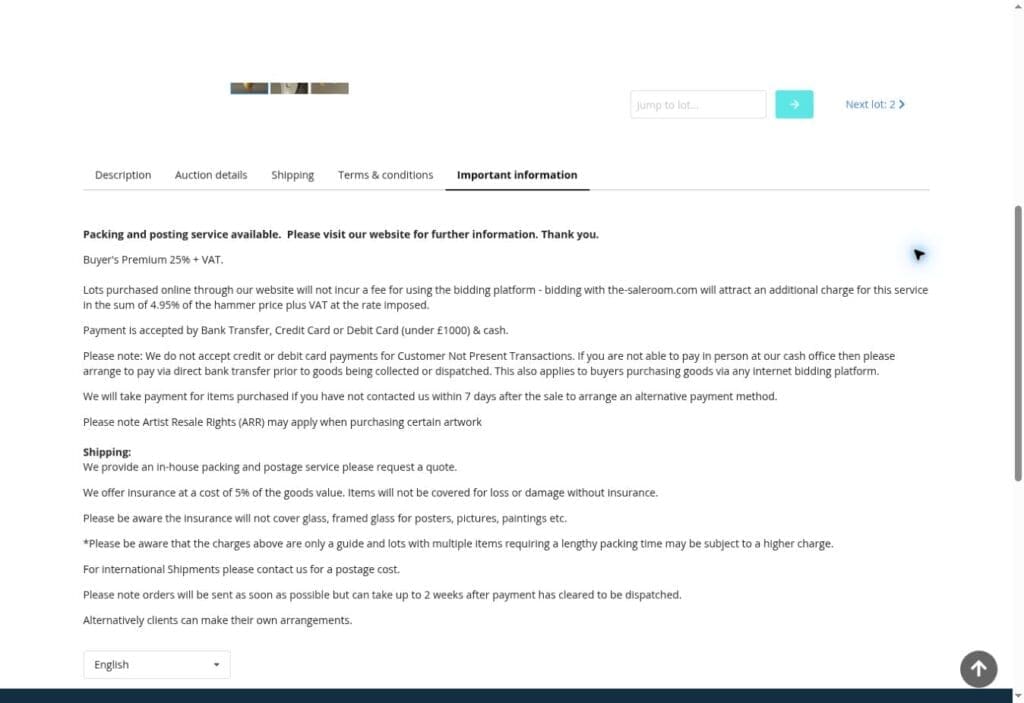
Read the sale information before bidding. The Important information tab explains the premium and other purchase arrangements.
5) Leave a maximum bid before the auction
You can leave a maximum bid before the auction if you cannot join the sale live. This is the highest hammer price you are willing to bid for that lot; allow for the premium and other charges separately.
Find the bidding panel on the lot page and check the minimum amount you can bid. Our example shows Current bid, Next minimum bid and the Enter your maximum bid box.
1. Check the lot number and description so you are bidding on the correct item.
2. Enter the maximum hammer price you are comfortable paying, taking account of the next minimum bid and the bidding increments.
3. Review the lot and maximum amount carefully, then select Place bid. If a confirmation screen appears, check the details and confirm.
4. Check that your bid has been recorded. You can find Placed bids in the Your account menu.
Your maximum bid sets the highest hammer price you are willing to pay. You may buy for less, depending on competing bids, any reserve and the bidding increments. Leaving a maximum bid does not guarantee that you will win.
For example, a £50 maximum bid is a £50 hammer-price limit, not a £50 total spending limit. If you win at that maximum, the example in step 4 would total £65 before other applicable charges.
Only submit a bid if you are prepared to buy and pay for the lot if successful. Adding a lot to your watchlist simply saves it for reference; it does not place a bid.
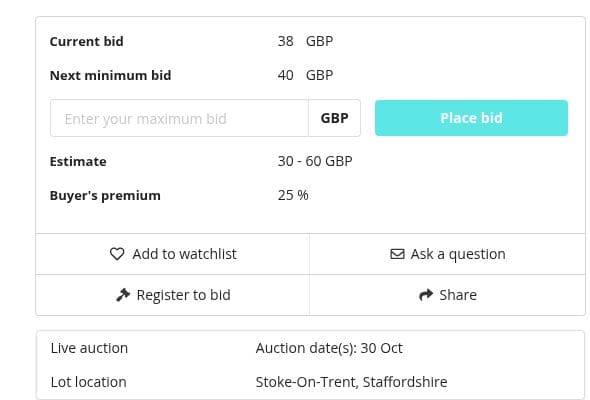
The bidding controls on the example lot include the maximum-bid field and Place bid, Register to bid, Add to watchlist and Ask a question. The figures are illustrative and may change.
6) Join the live auction if you prefer
If you would like to take part as the auction happens, sign in and make sure you are approved for that sale before it begins. Open the live bidding screen from the auction page when it becomes available.
Watch the current lot number and the amount being requested. Only use the bidding control when you intend to place the bid shown, and keep within the budget you have set.
The advertised start time is for the auction as a whole. Lots are offered during the sale, so be ready before the item you want comes up. A bid showing before the auction is not a confirmed purchase.
7) Pay and arrange collection or delivery
If you are the successful bidder, follow the instructions on your invoice to pay for your purchase and arrange collection or delivery. Check the saleroom address carefully, as our auctions take place at different locations.
Confirm the payment and collection deadlines for your sale. Storage charges can apply to purchases that remain uncollected, so contact us promptly if you need to make arrangements.
Need help getting started?
If you are unsure how to register, have a question about an item or would like to discuss collection or delivery, contact our team before bidding.
Cobridge Saleroom: 01782 212489. Silverdale Saleroom: 01782 638100. Email: enquiries@potteriesauctions.com.
Ready to see what is coming up? Browse our latest auction catalogues and find something you would love to own.